

3 WooCommerce Optimization Solutions That Improve Speed, Analytics, And Conversions
Running a WooCommerce store is exciting. But let’s be honest. It can also be frustrating. Slow pages. Confusing reports. Visitors who leave without buying. It feels like trying to fill a bucket with holes.
The good news? You don’t need a complete rebuild. A few smart optimization solutions can dramatically improve your store’s speed, analytics, and conversions. Small changes. Big results.
TLDR: Speed, analytics, and conversion optimization are the three pillars of a successful WooCommerce store. Faster sites rank higher and sell more. Better analytics help you make smarter decisions. Conversion tools turn visitors into customers. Use the right tools together, and your store becomes a revenue machine.
Why Optimization Matters More Than Ever
Online shoppers are impatient. Very impatient.
- If your store takes more than 3 seconds to load, many visitors leave.
- If your data is messy, you make bad decisions.
- If your checkout is complicated, customers disappear.
Optimization fixes these problems. It removes friction. It makes shopping easy. And when things feel easy, people buy more.
1. Speed Optimization: Make Your Store Lightning Fast
Speed is money.
A faster WooCommerce store means:
- Higher Google rankings
- Lower bounce rates
- Better mobile performance
- More completed purchases
Imagine walking into a physical store and waiting 10 seconds for the door to open. You would leave. Online shoppers feel the same way.
Top Speed Optimization Solutions
1. Caching Plugins
Caching stores ready-to-serve pages. Visitors load pre-built versions instead of generating pages from scratch.
Popular tools:
- WP Rocket
- W3 Total Cache
- LiteSpeed Cache
These plugins handle:
- Page caching
- Browser caching
- File minification
- Database cleanup
2. Image Optimization
Large images slow everything down. Compress them without losing quality.
Tools like ShortPixel or Imagify automatically reduce file size and convert images to modern formats like WebP.

3. Content Delivery Network (CDN)
A CDN stores copies of your website around the world. Visitors load your site from the nearest server.
This means faster load times globally.
Cloudflare is a popular choice. It also adds security benefits.
4. Fast Hosting
Don’t ignore hosting. Cheap hosting often means slow performance.
Look for:
- WooCommerce-optimized servers
- SSD storage
- Server-side caching
- PHP 8+ support
Pro tip: Before installing dozens of plugins, upgrade your hosting. It often makes the biggest difference.
2. Advanced Analytics: Understand What’s Really Happening
Speed brings visitors. Analytics tell you why they buy. Or why they don’t.
Guesswork kills growth. Data fuels it.
What You Should Be Tracking
- Conversion rate
- Average order value
- Cart abandonment rate
- Traffic sources
- Best-selling products
WooCommerce has built-in reports. But they are basic. To truly optimize, you need deeper insights.
Top Analytics Solutions
1. Google Analytics 4 with WooCommerce Integration
GA4 shows user behavior across devices. With enhanced ecommerce tracking, you can see:
- Product views
- Add-to-cart events
- Checkout steps
- Purchase data
This reveals exactly where users drop off.
2. MonsterInsights
This plugin connects WooCommerce to Google Analytics easily. No code needed.
It adds:
- Detailed ecommerce reports inside WordPress
- Conversion tracking
- Affiliate link tracking
3. Metorik
Metorik is built specifically for WooCommerce.
It provides:
- Customer lifetime value
- Segmentation tools
- Email reporting
- Real-time insights
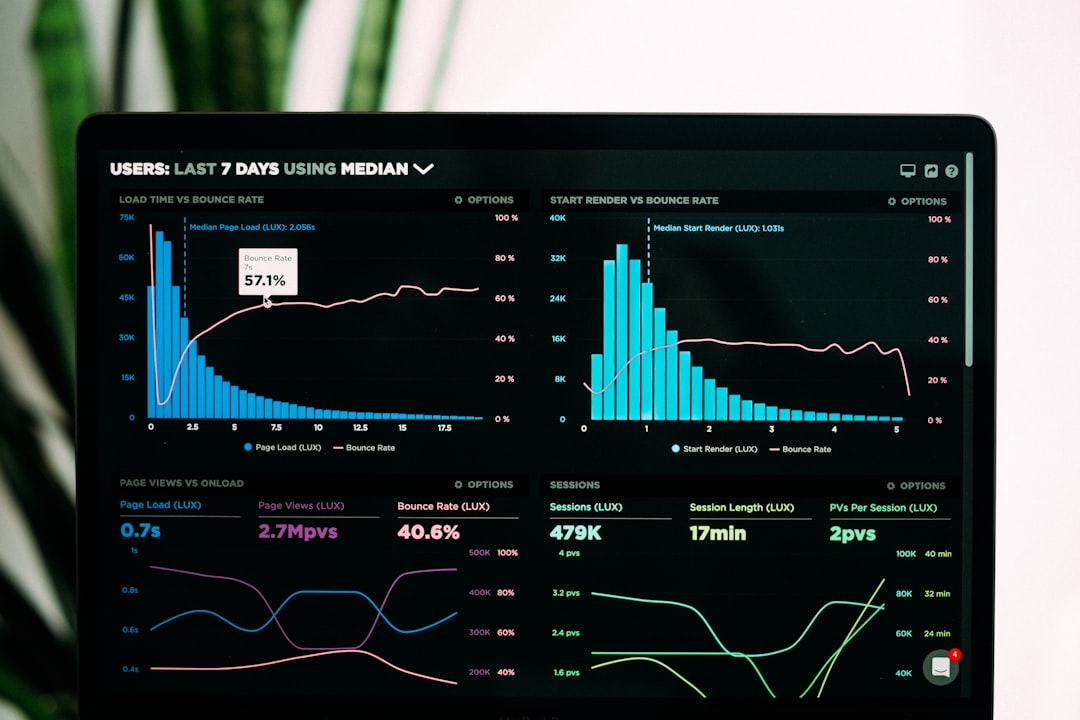
With proper analytics, you can answer powerful questions:
- Which traffic source converts best?
- Which coupons hurt profit margins?
- What products are frequently bought together?
When you know these answers, growth becomes predictable.
3. Conversion Optimization: Turn Visitors Into Buyers
You can have fast pages and perfect data. But if your store doesn’t persuade people, you lose money.
Conversion optimization focuses on improving small details that make a big difference.
Key Conversion Boosters
1. Optimized Checkout
Complicated checkout processes reduce sales.
Best practices:
- Enable guest checkout
- Reduce form fields
- Offer multiple payment methods
- Add express payments like Apple Pay or Google Pay
Plugins like WooCommerce Checkout Field Editor help simplify the process.
2. Cart Abandonment Recovery
Many users add to cart but never complete the purchase.
Recover them with:
- Automated email reminders
- Exit-intent popups
- Time-sensitive discounts
Tools like CartFlows or WooCommerce Cart Abandonment Recovery handle this automatically.
3. A/B Testing Tools
Never assume. Test.
Test things like:
- Button colors
- Product descriptions
- Pricing displays
- Page layouts
Google Optimize alternatives or tools like Nelio A/B Testing work well with WooCommerce.
4. Social Proof and Trust Signals
Shoppers need reassurance.
Add:
- Customer reviews
- Star ratings
- Trust badges
- Clear return policies
These small elements reduce hesitation. Less hesitation means more sales.
Comparison Chart: WooCommerce Optimization Tools
| Tool | Main Purpose | Best For | Ease of Use |
|---|---|---|---|
| WP Rocket | Speed optimization | Improving load times fast | Very Easy |
| Cloudflare | CDN and security | Global performance boost | Moderate |
| MonsterInsights | Analytics integration | Beginner friendly reporting | Very Easy |
| Metorik | Advanced WooCommerce analytics | Deep customer insights | Easy |
| CartFlows | Conversion optimization | Sales funnels and checkout improvements | Moderate |
| Nelio A/B Testing | Split testing | Data driven design decisions | Moderate |
How These Three Solutions Work Together
Think of your WooCommerce store like a race car.
- Speed optimization is the engine.
- Analytics is the dashboard.
- Conversion optimization is the driver.
If one part fails, performance drops.
Fast site + no data = blind growth.
Great data + slow site = lost visitors.
Traffic + no conversion strategy = wasted money.
But when all three work together, magic happens.
- Visitors arrive quickly.
- You understand their behavior.
- You remove obstacles from their path.
- They complete purchases.
Simple Action Plan
Feeling overwhelmed? Start here:
- Install a caching plugin.
- Compress all images.
- Set up proper ecommerce tracking in GA4.
- Simplify your checkout page.
- Test one improvement every month.
Optimization is not a one-time event. It’s an ongoing process.
Small tweaks. Continuous testing. Constant improvements.
Final Thoughts
You don’t need a bigger advertising budget.
You need a better-performing store.
Focus on:
- Speed to keep visitors engaged.
- Analytics to guide smart decisions.
- Conversions to maximize revenue.
When your WooCommerce store loads fast, tracks accurately, and converts efficiently, growth becomes natural.
And the best part?
Most of these improvements are simple. Affordable. And incredibly powerful.
Start optimizing today. Your future customers are waiting.

